
krea
What Is Krea.ai?
Krea.ai is an AI creative platform that helps you create, edit, and improve visual content like images, videos, and 3D assets directly in your browser, making it one of the best AI image generation tools for turning ideas into high-quality visuals quickly and easily.
With Krea.ai, you can use text prompts or simple sketches to generate artwork, upload images for enhancement and upscaling, and train custom AI models using LoRA training. You can also create short AI videos and make changes in real time. The platform is built for idea generation, quick experimentation, and producing high-quality visuals without needing powerful hardware or complex tools.
Trusted by over 30,000,000 users from 191 countries around the world, Krea delivers very fast image generation, making it great for turning ideas into visuals quickly. Each image prompt creates 4 high-quality variations automatically, giving you more options to choose from. Video generation usually takes around 3 minutes, depending on how complex the video is.
In the free plan, users can usually create 1 video and 2 to 3 images
What can you do with Krea?
AI Image Generation
- Text to Image
- Realtime Image Generation
AI Image Enhancement
- Image Upscaling
- Generative Image Editing
AI Fine-tuning
- Image LoRA Finetuning
- Video LoRA Finetuning
- LoRA Sharing
AI Video Generation
- Text to Video
- Motion Transfer
AI Video Enhancements
- Frame Interpolation
- Video Style Transfer
- Video Upscaling
AI 3D Generation
- Text to 3D Object
- Image to 3D Object
File Management
- Krea Asset Manager
Most advanced tools, like image enhancements, video tools, AI fine-tuning, and 3D generation, are available in paid plans.
Explore powerful AI tools across every category, from image generators and automation tools to chatbots, design platforms, coding assistants, marketing AI, and 3D creation tools.
We test, review, and compare the best tools so you can find what truly works.
Here are the results from testing Krea.ai’s free version, which gives you a good idea of how powerful the pro version can be.
1. Prompt Used in Krea
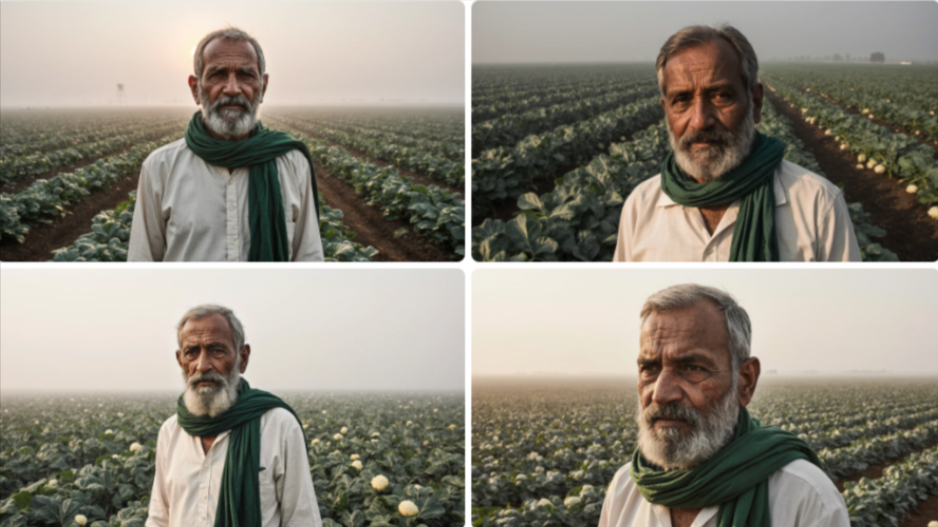
Ultra-realistic portrait of a 65-year-old Indian vegetable farmer with deep wrinkles, sun-tanned skin, grey beard, wearing a simple white kurta and a green cotton scarf (gamcha), standing in a misty vegetable field at sunrise, rows of fresh spinach and cauliflower behind him, cinematic lighting, 85mm lens, shallow depth of field, highly detailed skin texture, National Geographic style, ultra sharp focus.
Generated Result
2. Prompt Used in Krea
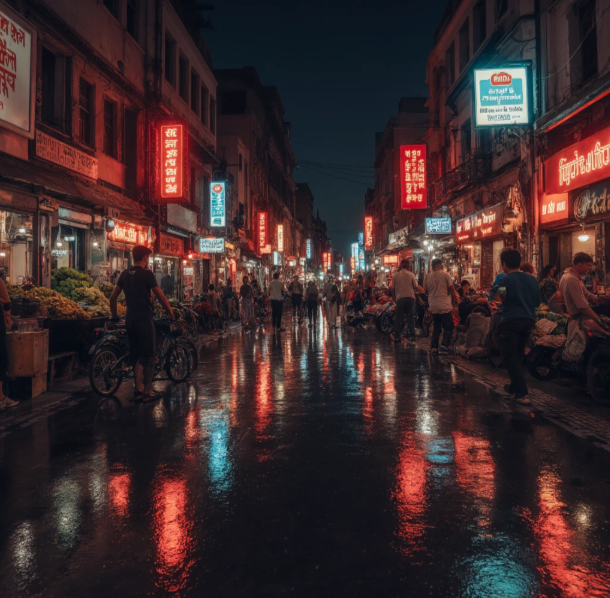
A busy futuristic street market in Mumbai at night, neon signs in Hindi and Marathi, light rain reflecting on the pavement, cyberpunk style, electric rickshaws passing by, street vendors selling fresh vegetables and vegetarian street food, people of different ages interacting, hundreds of small details, dynamic lighting, ultra-detailed, 8k resolution, cinematic wide-angle shot.
3. Prompt Used in Krea (Video)
A futuristic Mumbai street market at night in light rain, neon signs in Hindi glowing, people walking with umbrellas, steam rising from vegetarian street food stalls, reflections on wet pavement, camera slowly moving forward through the crowd, cyberpunk cinematic style, ultra-detailed, realistic motion, 4K
Pricing Plans:
| Plan | Price | Features |
|---|---|---|
| Free Plan | $0/month |
|
| Basic | Starting at $9/monthly & $7 yearly | Everything in Free plus:
|
| Pro | Starting at $35/monthly & 28 yearly | Everything in Basic plus:
|
| Max | Starting at $105/monthly & 84 yearly | Everything in Pro plus:
|
Key Features:
- Real-Time Image Generation
Users can generate images as they type or draw, enabling rapid iteration without waiting. This includes support for over 1,000 styles, a Realtime Canvas for live editing, and integration with models like Krea 1 (proprietary for ultra-realistic outputs with photorealistic skin, dynamic angles, and high complexity). - AI Video Generation and Enhancement
Create videos from prompts using models like DeepMind Veo 3.1, Runway, or Luma. Features include lipsync, upscaling to 22K resolution, and animation of static images. Real-time video generation (via Krea Realtime 14B) allows for long-form content. - 3D Generation and Editing
Turn text or images into 3D meshes, with real-time blending into backgrounds. Supports tools like AI 3D Generator for quick object creation.
- Image Editing Tools
Includes upscaling to 4K/22K, object removal, text removal, hairstyle changes, lighting adjustments, cartoonification, colorization, and clothes changing. Advanced editors like Nano Banana Pro allow style transfers and precise edits.
- Customization and Finetuning
Train LoRA models with up to 20,000 images for personalized AI (e.g., characters or styles). Krea Asset Manager handles file organization, and Krea Nodes/Apps enable custom workflows.
- Model Integrations
Access 64+ models in one place, including Ideogram, BFL Flux, Gemini, and proprietary ones like FLUX.1 Krea (distilled for aesthetics) and Wan 2.2 (fast, high-quality).
Strengths
-
- Real-Time Generation and Editing
-
- All-in-One Platform with Model Variety
-
- User-Friendly Interface and Accessibility
-
- Advanced Customization and Enhancements
-
- Industry-leading inference speed (e.g., 0.8 seconds for generations)
Weaknesses
-
- Limited Customer Support and Reliability
-
- Steep Learning Curve for Advanced Features