
6 Best AI Outfit Generators & Stylist Apps in 2026
It’s 7:15 AM. You have a closet full of clothes – maybe even too many – and you’re still standing there in a towel, staring at hangers, thinking the same tired thought: “I have nothing to wear.“
Sound familiar? You’re not alone, and you’re not bad at fashion. You just haven’t had a tool that actually knows what’s in your closet, what looks good together, and what fits the day ahead. That’s exactly the gap AI outfit generators and AI stylist apps are built to close.
Maybe you’ve already typed “AI outfit generator” or “AI stylist app” into Google a few times this month, scrolled through a couple of App Store listings, and closed the tab feeling more confused than when you started. Which app is actually good? Which ones are free? And more importantly, which ones look great in the screenshots but fall apart once you’re actually using them?
That’s what this guide is for. We didn’t just skim app store descriptions and rewrite them. We dug into what each tool actually does, what it costs, where it genuinely helps, and where it falls short, so you can pick the right one on the first try.
Let’s get into it.
TL;DR: Best AI Outfit Generators & Stylist Apps in 2026
The best AI outfit generator overall is Whering (free, unlimited outfits from your own wardrobe), the best AI stylist app with human backup is Indyx, and the best AI outfit generator for brands and creators is Botika. Personal styling apps (Whering, Acloset, Indyx, Cladwell, Stitch Fix) work with clothes you already own; brand-facing tools like Botika generate AI models wearing your products for e-commerce photos.
- Whering – best free option overall
- Acloset – best for automatic AI tagging
- Indyx – best analytics + optional human stylist
- Cladwell – best for capsule wardrobes
- Stitch Fix – best hybrid AI + human styling box
- Botika – best AI outfit generator for brands and creators
Full breakdown, pricing, and honest pros and cons for each are below.
Quick Answer: The 7 Best AI Outfit Generators & Stylist Apps
Short on time? Here’s a quick summary. We’ll explain each point in detail below.
| Tool | Best For | Price | App Rating |
| Whering | Best free all-around wardrobe & outfit app | Completely free | 4.4/5 (App Store) |
| Acloset | Best AI auto-tagging for lazy closet cataloging | Free (100 items) and price shown in-app only | 4.7★ Google Play, 85.2/100 legitimacy score |
| Indyx | Best wardrobe analytics + optional human stylist | Free tier / $12.99/month or $74.99/year | Mostly 5-star independent reviews |
| Cladwell | Best for building a capsule wardrobe | Free (limited) / $7.99/month | Mixed Reviews – 4.0–4.3 |
| Stitch Fix | Best hybrid AI + human stylist subscription box | $20 styling fee per box | 2.0/5 (Trustindex, 348 reviews) |
| Botika | Best AI outfit/model generator for brands & creators | From ~$22–$29/month (credit-based) | Mixed, strong on quality/weak on support |
Two Very Different Kinds of “AI Outfit Generator”
It’s the single most important thing to understand before you download anything: “AI outfit generator” actually means two different things, depending on who is searching for it.
Group A: Personal styling apps. These are for you, the shopper. You upload photos of the clothes you already own, and the AI mixes and matches them into outfits, tracks what you wear, and tells you what goes with what. Whering, Acloset, Indyx, Cladwell, and Stitch Fix all fall here.
Group B: AI model and image generators. These are for brands, online sellers, and content creators. Instead of styling your own wardrobe, they put clothing on AI-generated models to create product photos, lookbooks, and ad creative – no photoshoot needed. Botika falls here.
If you just want help getting dressed in the morning, you want Group A. If you run a clothing brand or shop and need product images without hiring a photographer, you want Group B. We’ve included both types in this list because both searches land on “AI outfit generator,” and picking the wrong category wastes far more time than picking the wrong app within the right category.
There’s a growing third group too, parents and kidswear brands looking for AI tools made just for children’s clothes. We’ve covered those separately in our guide to AI Outfit Generators for Kids.
1. Whering – Best Free All-Around Wardrobe & Outfit App
What is it, exactly? Whering is a digital wardrobe app with over 7 million users. You photograph the clothes you own, the app automatically removes the background and files them into a digital closet, and from there you can build outfits, plan them on a calendar, and let the app shuffle combinations for you.
What can it actually do?
- “Dress Me” shuffle – a Clueless-inspired feature that randomly combines your own wardrobe items into outfit ideas
- W Pick – an AI-driven suggestion tool that shows up to six outfit options built from what you own, and improves the more you use it
- Outfit Planner – schedule outfits ahead of time on a calendar, useful for trips or busy weeks
- Packing lists – build a Lookbook for a trip, and Whering generates a checklist automatically
- Style analytics – cost-per-wear tracking, wear-rate stats, wardrobe colour breakdown, and wardrobe longevity data
- Social features – see friends’ wardrobes and wishlists, or style a friend’s closet for them
Is it really free? Yes – and Whering states this directly on its own FAQ page: “Whering is completely free to use.” Unlimited outfit creation, unlimited wardrobe uploads, and the core features all come with no ads and no paywall. There is also an optional paid “Style Pass” that unlocks the Outfit Maker and a few extra styling tools on top of the free experience, but it’s an add-on, not a requirement – you don’t need it to use the app fully.
What do real users say once you look past the star rating? Whering sits at a strong 4.4/5 on the App Store, and the App Store reviews genuinely reflect a lot of love for the concept – people call it “the best kept secret” and credit it with changing how they shop.
But when you dig into independent feedback aggregators like JustUseApp and Kimola’s review analysis, a second pattern shows up clearly: recurring complaints about crashes, lagging, and outfits disappearing. One user reported that their entire saved outfit collection turned into black exclamation marks overnight and never came back. Background removal is also inconsistent for some uploads, occasionally requiring a retry.
Is it available beyond the app? Yes – besides the iOS and Android app, Whering also has a free Chrome extension. It’s a small but genuinely useful addition if you shop online often and want to log new pieces without extra effort.
Who should skip it? Anyone who wants a completely glitch-free experience every single time – the crash and lag complaints are frequent enough in reviews that they’re worth factoring into your expectations, not just a rare outlier.
2. Acloset – Best AI Auto-Tagging for Lazy Closet Cataloging
Best for: People who own a lot of clothes and don’t want to manually tag every single item.
Acloset (also marketed as an “AI Fashion Assistant“) is built around one core idea: make the boring part, cataloging your wardrobe, as automatic as possible. You snap a photo of a garment, and the AI removes the background and tags the category and colour for you.
Key features:
- Automatic background removal and tagging on upload, with detection that works even from mirror selfies in some cases
- AI outfit suggestions based on weather, occasion, and your saved style preferences
- Colour and body-type guidance to help outfit suggestions actually suit you, not just match randomly
- Community feed – browse other users’ outfits and closets for inspiration
Pricing: Up to 100 items are free, with full access to all features while you’re under that limit. Once you cross 100 items, a monthly subscription is required to keep adding to or using your wardrobe. One thing worth knowing upfront: Acloset doesn’t show any pricing on its website – subscription options and exact prices only appear inside the app itself once you hit the 100-item cap, and reported figures ($3.99–$24.99/month depending on tier) can only be 100% confirmed by logging into the app.
Review sentiment: JustUseApp’s legitimacy analysis, based on 2,903 user reviews, scores Acloset at 85.2/100 – a genuinely solid number. Google Play ratings sit around 4.7 stars. The praise is real: many users say it’s the easiest wardrobe app to get started with.
The part most reviews leave out: A recurring, more serious complaint is about what happens when you try to leave. Multiple Google Play reviewers report that after subscribing, the app is difficult to export your own data from – one user specifically noted there’s no way to download your item categories or descriptions, only individual images shared one at a time, and called this a breach of GDPR data-portability expectations. Another reviewer described the paid plan structure as confusing: after subscribing to remove ads, they were still shown ads unless they paid for a further upgrade.
Pros: Most automated cataloging experience on this list, large and active user base, genuinely usable free tier for smaller wardrobes.
Cons: Free tier cap can trigger a paywall lockout with little warning; some users find outfit suggestions disjointed from their personal style; occasional crashes when editing background removal.
Skip it if: you want easy control over exporting your own data down the line, or you specifically dislike apps with tiered “pay more to actually remove ads” structures.
3. Indyx – Best Wardrobe Analytics With an Optional Human Stylist
What is it, and how is it different from the others? Indyx sits between a pure wardrobe app and a styling service. It digitizes your closet – either by uploading photos yourself or forwarding shopping receipts, which auto-adds items – and layers detailed analytics and optional professional styling on top.
What features actually stand out?
- Receipt forwarding – email your shopping confirmations to Indyx and new purchases get logged automatically, a feature no other app on this list offers
- AI auto-tagging with background removal, rated by multiple independent reviewers as the most accurate tagging in the category, correctly identifying garment type, colour, brand, and even fabric in most uploads
- Wardrobe analytics dashboard – cost-per-wear, wear frequency, wardrobe value estimates, and category/colour breakdowns
- Human stylist marketplace – hire a real stylist to build lookbooks from your actual wardrobe, with services starting around $50–$60
- In-home cataloging service – for a fee starting at $295, Indyx sends someone to physically photograph and catalog your wardrobe, solving the single biggest pain point in this entire category: the 8–15 hours it typically takes to set up a 100–200 item wardrobe yourself
How much does it actually cost, and is it worth it?
When you download Indyx, you get a free 14-day Insider Preview with access to all premium features. You don’t need to pay anything upfront. After the 14-day preview ends, you can start another 7-day free trial whenever you want. If you cancel before the trial ends, you won’t be charged.
One thing to know is that Indyx doesn’t show the subscription price before you start a trial. The price only appears when your trial is about to end. Even without a subscription, the free version is useful. You can digitize unlimited clothing items, create unlimited outfits, track what you wear with a calendar, and make packing lists without ever starting a trial.
If you choose the Insider membership, it costs $12.99 per month or $74.99 per year. It includes the full analytics dashboard, HD image viewing, and advanced organization tools.
People who have used Indyx for a long time say the analytics, especially cost-per-wear and item lifetime tracking, helped them shop more wisely. They also feel the subscription is worth the price.
What do users say, honestly? Feedback on Indyx skews strongly positive across independent blog reviews and its own community, with users specifically praising the packing-list feature for travel and the depth of the analytics. The most common hesitation isn’t about bugs or hidden terms – it’s simply the price of the Insider tier for casual users who only want basic wardrobe photos, and the fact that outfit-suggestion AI itself is considered more basic than competitors that are styling-first (Indyx is stronger at tracking your wardrobe than at generating creative outfit ideas).
Who should skip it? If AI-generated outfit ideas are your main priority rather than wardrobe data and analytics, Indyx will feel like the wrong tool – it’s a tracking and analytics platform first, a stylist second.
4. Cladwell – Best for Building a Capsule Wardrobe
Best for: Minimalists who want fewer, better clothes and a structured system for building a capsule wardrobe from scratch.
Cladwell takes a different approach from the other apps here. Instead of starting with your existing closet, it hands you one of over 30 pre-built capsule wardrobe templates and helps you swap in your real items over time, nudging you toward a smaller, more intentional collection.
Key features:
- Capsule wardrobe templates covering work, travel, seasonal rotations, and more, so you’re not starting from a blank slate
- Daily outfit suggestions that factor in local weather and what you’ve recently worn
- “Ask Cladwell” – a ChatGPT-powered styling chat where you can ask outfit and wardrobe questions directly
- Wardrobe gap tracking – the app highlights what’s missing from your capsule so you shop with intention
- Human stylist add-on – for a higher-tier fee, you get access to a real stylist via text or email
- Account safety net – unlike some competitors, deleting the app doesn’t delete your closet data; your wardrobe is tied to your email account, so reinstalling brings everything back
Pricing: The free plan includes limited daily outfit suggestions and AI messages. The $7.99/month plan unlocks unlimited outfits, full analytics, and more AI access. Human stylist services are available as add-ons (pricing varies).
Review sentiment and a recurring complaint: Cladwell has around 76 recorded negative reviews and comments across tracked platforms, and the single most repeated complaint is that the outfit-suggestion algorithm often ignores context – multiple users specifically describe being recommended cardigans and layered pieces during 100°F heatwaves, and some report the app appears to overlook large parts of their uploaded wardrobe entirely when generating suggestions.
What does “Ask Cladwell” actually feel like to use?
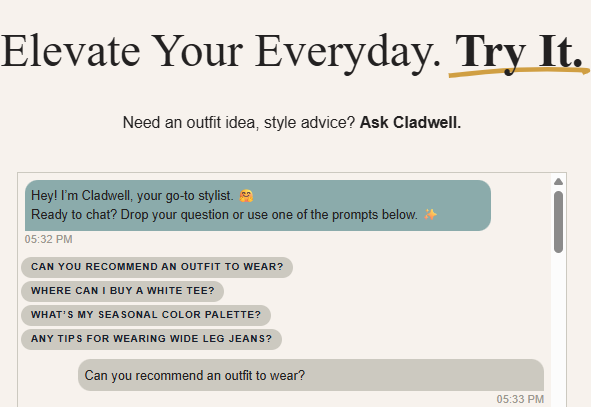
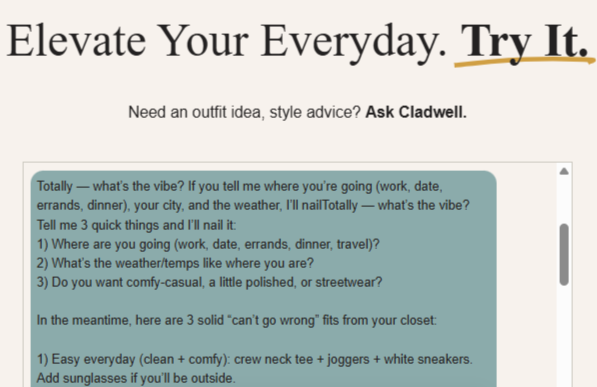
Right on Cladwell’s homepage, the chat opens with a few quick-tap prompts – things like “Can you recommend an outfit to wear?” “Where can I buy a white tee?”, “What’s my seasonal colour palette?”, or “Any tips for wearing wide-leg jeans?”
So you’re not stuck typing your question from scratch. If you ask for an outfit, it doesn’t just guess; it asks you three quick things first: where you’re headed (work, date, errands, dinner, travel), what the weather’s like, and whether you want comfy-casual, polished, or streetwear, then gives you a few “can’t go wrong” outfit combinations pulled straight from your own closet. It feels less like a static suggestion engine and more like texting a stylist who already knows your wardrobe.
Pros: Only app here built specifically around capsule wardrobe methodology; ChatGPT-powered chat is genuinely useful for specific questions; your data survives an accidental app deletion.
Cons: Free tier is quite restrictive; outfit suggestions can be weather-inept or repetitive according to multiple reviewers; feature development has reportedly slowed for individual (non-stylist) users.
Skip it if: you have a large wardrobe you want to use as-is, not shrink – Cladwell’s entire structure assumes you want to move toward a smaller, curated capsule.
5. Stitch Fix – Best Hybrid AI + Human Stylist Subscription Box
What is this, and how is it different from a wardrobe app? Stitch Fix works differently from every other tool on this list. It’s a clothing subscription service where AI narrows down hundreds of thousands of items based on your stated preferences, size, and budget, and a human stylist then builds your actual box from that shortlist.
It also has an AI visualization feature called Vision that generates images of you wearing styled outfits before you commit to buying.
What do you actually get for the styling fee?
- AI-assisted curation – the algorithm filters a massive catalog down to a relevant set, and your assigned human stylist picks the final items.
- Stitch Fix Vision – uses your photo to generate images of yourself wearing personalized outfit ideas, so you can preview looks before your box arrives.
- FreeStyle shopping – buy individual items directly without waiting for a scheduled box
- Style quiz onboarding – a detailed preference quiz on size, style, and budget that trains both the algorithm and your stylist
- Family accounts – separate style profiles for men, women, and kids under one account
How much does it cost, exactly? A $20 styling fee applies per box, credited toward anything you keep. If you keep every item in a box, you typically get a 25% discount on the full order. Individual items are priced by brand and can add up quickly – several long-term reviewers describe it as “pretty pricey” even at the lower end.
Is the styling fee really non-refundable? Yes, and this is where a lot of the frustration in reviews concentrates. The $20 fee applies per box regardless of what you keep – multiple reviewers describe being charged the styling fee even after returning every single item because nothing matched what they’d asked for. It functions less like a deposit and more like a guaranteed charge for the curation service itself.
What do real, verified reviews actually say? This is the one tool on this list where the gap between brand marketing and independent review sentiment is largest. On Trustindex, Stitch Fix sits at a below-average 2.0/5. Common, recurring complaints include: stylists not following stated preferences (several reviewers describe receiving items explicitly marked as unwanted), inconsistent item quality (pilling, shrinking, and poor wash durability reported on some pieces despite premium pricing), and – most frequently – genuine difficulty cancelling the subscription, which multiple reviewers describe as requiring “hidden menus” or a “scavenger hunt” through settings.
That said, longer-term users who are highly specific in their style profile (down to exact brands and fits they’ve liked before) report noticeably better outcomes over time, suggesting the service rewards detailed upfront input.
Who should skip it? If your main goal is styling clothes you already own rather than buying new ones, or if you want predictable costs without a recurring styling fee, Stitch Fix isn’t built for that – it’s a shopping-discovery service first.
6. Botika – Best AI Outfit & Model Generator for Brands and Creators
Best for: Fashion brands, online sellers, and content creators who need product photos of clothing on models without booking a photoshoot.
Botika is the outlier on this list, and it belongs here because plenty of people searching “AI outfit generator” actually mean this: put a garment on a realistic AI model and generate a usable photo. Instead of styling your own closet, Botika takes your flat-lay or ghost-mannequin product photos and generates images of AI models wearing them, styled and photographed for e-commerce.
Key features:
- AI model generation – describe or select a model (ethnicity, body type, age, pose) and Botika places your garment onto them realistically
- Batch processing – process entire product catalogs at once rather than one image at a time
- Consistent model identity – reuse the same AI model across multiple product photos for a cohesive catalog look
- Video generation – animate garments to show drape and movement in short clips, at 5 credits per video
- Ghost mannequin processing – automatically fills in and removes mannequin forms from product shots
- Shopify integration – a native Shopify app for direct catalog updates, plus an iOS app for on-the-go shooting and processing
Pricing: Credit-based, starting around $22–$29/month for entry plans (Shopify app users get the first 8 photo credits free). Broader plans scale from roughly $15 to $225/month for 15 to 300 credits, working out to about $0.75–$1.10 per image depending on the tier.
Review sentiment: Feedback is genuinely mixed and polarized rather than uniformly positive or negative. Many merchants report real cost savings and describe the output as a meaningful upgrade to their product imagery. But a consistent cluster of complaints centers on three things: image accuracy (blurred textures, warped logos, and distorted hands or accessories on some generations – a known limitation of diffusion-based fashion image tools generally, not unique to Botika, but frequently reported here), delivery delays during high-demand periods, and customer support responsiveness, with several users describing slow or non-existent replies to billing disputes.
Pros: Purpose-built for fashion e-commerce; can meaningfully cut photoshoot costs; video generation alongside stills is rare in this category; diverse, reusable AI model library.
Cons: Meaningfully more expensive per image than some newer competitors; image quality can be inconsistent with complex garments or heavy layering; refund policy is unusually strict; support responsiveness during high-demand periods is a recurring complaint.
Skip it if: you’re an individual looking for personal styling help rather than commercial product photography, or you’re not comfortable with a strict no-refund policy on unused credits.
How to Choose the Right One for You
Instead of guessing, match your actual situation to a tool:
- “I want a free app to stop wasting money on clothes I don’t wear.” → Start with Whering.
- “I don’t want to spend hours tagging every item by hand.” → Acloset.
- “I want real data on my wardrobe and maybe a human stylist too.” → Indyx.
- “I own too much and want to simplify into a smaller, smarter wardrobe.” → Cladwell.
- “I hate subscriptions and want total manual control.” → Stylebook.
- “I want new clothes picked for me, not just outfits from what I own.” → Stitch Fix.
- “I run a clothing brand and need product photos without a photoshoot.” → Botika.
If none of these feel like a perfect fit, or you want to see what else exists in the wider AI tools space beyond fashion, ToolsFlood’s tool directory is worth a browse.
Frequently Asked Questions
What is an AI outfit generator?
An AI outfit generator is an app that uses artificial intelligence to create outfit combinations automatically, either from clothes you already own or from a product catalog. It typically works by analyzing photos of garments, then matching colours, styles, and occasions to suggest complete looks – removing the need to plan outfits manually.
Is an AI outfit generator the same as an AI stylist?
No, not exactly – though the two terms are often used interchangeably in the app market. An AI outfit generator focuses on automatically combining clothing items into outfits, while an AI stylist adds a layer of personalized advice, such as colour analysis, body-type guidance, or even a real human stylist reviewing the AI’s picks. In short: every AI stylist uses outfit-generation technology, but not every outfit generator offers full styling advice.
What is the best free AI outfit generator?
Whering is currently the strongest free option. It offers unlimited outfit creation, wardrobe cataloging, and analytics with no paywall on the core features, which is unusual in this category – though occasional crashes are a known trade-off.
Can AI actually style outfits well, or is it just randomizing my clothes?
It depends on the app. Basic tools shuffle your wardrobe somewhat randomly. Stronger tools like Whering’s W Pick or Indyx’s analytics-informed suggestions factor in more context, and they improve the more you use them. None of them fully replace a human stylist’s eye yet.
Do I need to photograph my entire wardrobe to use these apps?
Yes, for the personal wardrobe apps (Whering, Acloset, Indyx, Cladwell, Stylebook) – the AI can only style what it knows you own. Expect to spend several hours cataloging a full closet, though apps like Acloset and Indyx speed this up with automatic tagging, and Indyx offers a paid in-home cataloging service if you’d rather not do it yourself.
Are AI outfit generators for brands different from ones for personal use?
Yes, and this trips a lot of people up. Personal styling apps work with your own closet. Tools like Botika instead generate images of clothing on AI models for product photography and marketing – built for sellers and creators, not for everyday outfit planning.
Final Thoughts
Whichever tool fits your situation, the real win isn’t the app itself – it’s spending less time each morning deciding what to wear, and getting more actual use out of the clothes you already own. Start with one free option, use it for a couple of weeks, and you’ll know quickly whether it’s solving the problem or just adding another app to your phone. And if fashion tools are just one piece of the AI toolkit you’re exploring, ToolsFlood is a good next stop to see what else is out there across writing, image generation, coding, and more – all in one place.
Comments