
How to Design 3D Metallic Logos Using Free AI Tools
It’s 1 AM. You’ve got a launch in 2 days, a brand name picked out, and zero budget left for a designer. You open Google, type “free metal logo generator,” and land on ten different pages that all say the same three lines and then send you to a $65 checkout page.
Sound familiar?
That’s exactly the problem this guide is here to fix. If you’re searching for a free AI metal logo generator that can turn your brand name into a shiny chrome, brushed steel, or gold 3D logo – without a design degree, without Photoshop, and without your card getting charged the moment you hit “download” – you’re in the right place. This isn’t a listicle stitched together from other blogs. Every tool below has been opened, tested, and checked for what it actually gives you for free, so you don’t have to bounce between ten tabs to find out.
By the end of this, you’ll know exactly what a 3D metal logo is, how AI actually builds one, which free tools are worth your time, and how to write a prompt that gets you a logo on the first try.
Quick Answer
Yes, you can design a real 3D metallic logo – chrome, gold, or silver – completely free, using AI tools like Meshy AI, Mew Design, MyAIArt, and insMind, or free renderers like TextStudio. Just describe your brand name, pick a metal finish (chrome, gold, silver, or brushed steel), add lighting and background details in your prompt, and the AI builds the 3D look for you in seconds. No design skills, no software, and no card needed to get started. Keep reading below for the full step-by-step process, 6 tested tools with their real free limits, and ready-to-use prompts.
What Is an AI Logo Generator?
An AI logo generator is a tool that takes what you type – your brand name, initials, or a short description – and turns it into a logo design using a trained image or 3D model instead of a human designer manually drawing it. You describe what you want (“a chrome wordmark with a bold sans-serif font”), and the AI predicts and builds a matching image based on patterns it learned from millions of design examples.
There are two broad types worth knowing before you pick a tool:
- Template-based AI logo makers – These ask you questions (industry, style, colors) and then mix and match pre-built icons, fonts, and layouts. Fast, but results can feel generic.
- Prompt-based AI logo generators – These read a text description and generate a fresh image or 3D model from scratch. Slower to master, but far more flexible for something specific like a metal logo generator result with a particular finish or lighting.
For metallic and 3D work specifically, prompt-based tools tend to give you more control, because “chrome,” “brushed steel,” and “gold-plated” are material instructions the AI needs to actually understand and render, not just a color swap.
What Is a 3D Metallic Logo?
A 3D metallic logo is a logo design that looks like it’s made from real metal – chrome, gold, silver, steel, or bronze – with depth, light reflections, shadows, and a raised or engraved surface, instead of being flat.
Think of the difference between a logo that’s just colored silver, and a logo that actually looks like it was cast in metal and photographed under studio lights.
That second one has real depth, where the letters or icon appear to stick out from, or sink into, the surface instead of sitting flat on top of it. It has reflection and highlights, so light bounces off the surface the same way it would on an actual piece of metal, not just a flat color fill.
It carries genuine material texture too – brushed lines, a polished shine, or a rough patina, depending on which metal you’re going for. And it has shadow and lighting direction, which is really the detail that sells the whole “this is actually 3D” illusion, because without the right shadow falling in the right place, even a well-shaped logo can look fake.
This look is popular with automotive, gaming, fitness, tech, and heavy-metal band brands because it instantly signals strength, durability, and a premium feel – something a flat logo struggles to do on its own.
5 Free AI Tools to Design 3D Metallic Logos (Tested )
We actually checked each of these, and I’ve attached the results here, so you know exactly what to expect before committing your time.
1. Meshy AI – Best for Real 3D Metal Logo Files (GLB, OBJ, STL)
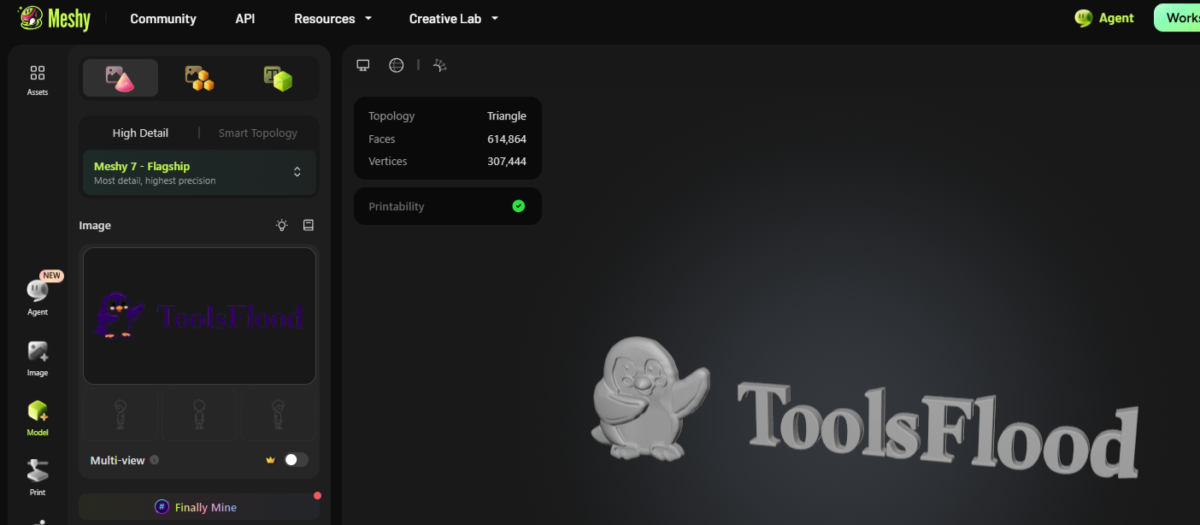
Meshy is a 3D metal logo tool built for people who need an actual 3D model, not just a flat image that looks 3D. You upload your existing logo as an SVG, PNG, or JPG, and Meshy’s browser tool shows you an instant WebGL preview of it spinning in 3D – no login needed for this preview step.
To generate the full production version, you move into Meshy Workspace, which comes with free trial credits and no card required. From there, the AI image-to-3D pipeline builds a fully textured 3D mesh of your logo, which you can export as:
- PNG – transparent background, ready for thumbnails, social posts, or slides
- GLB / OBJ – ready to drop into Unity, Unreal Engine, Roblox Studio, or AR experiences, with no watermark
- STL – geometry-only, made for 3D printing your logo as a real physical object
What makes it different from the others on this list: most AI logo tools give you a picture of a 3D logo. Meshy gives you an actual 3D object you can rotate, animate, print, or use in a game engine.
Good to know before you start: it’s an image-to-3D converter, not a text-to-logo generator, so you need a starting logo (even a simple black text file works) before you upload it.
Best for: creators who need their metal logo as a real 3D asset – game devs, streamers, product designers, or anyone 3D printing a badge or emblem.
| Detail | Info |
| Free credits | 100 credits/month, auto-reset on the 1st at 00:00 UTC |
| Cost per generation | ~20 credits for one Text-to-3D or Image-to-3D generation (about 5 generations/month on free) |
| Daily check-in bonus | Meshy runs a 5-day check-in reward inside the app: Day 1 gives 30 credits, Day 2 another 30, Day 3 and 4 give 50 each, and Day 5 gives 100 credits plus 1 free download – so logging in 5 days in a row is currently the one confirmed way to unlock an actual download on the free tier. These bonus credits do expire on a set date (shown in-app, e.g., “Credits expire on Sep 19, 2026”), unlike the separate loyalty-credit program, which is permanent |
| Editable / format | Not an editable vector file – exports as PNG, GLB, OBJ, or STL (3D mesh formats) |
| Common complaints | Users report the free tier feels more like a demo than a working free tool since downloads are mostly gated behind payment; also mixed reports on complex shapes/anatomy not rendering cleanly |
2. Mew Design – Best for Prompt Control Over Chrome, Gold, and Metal Materials
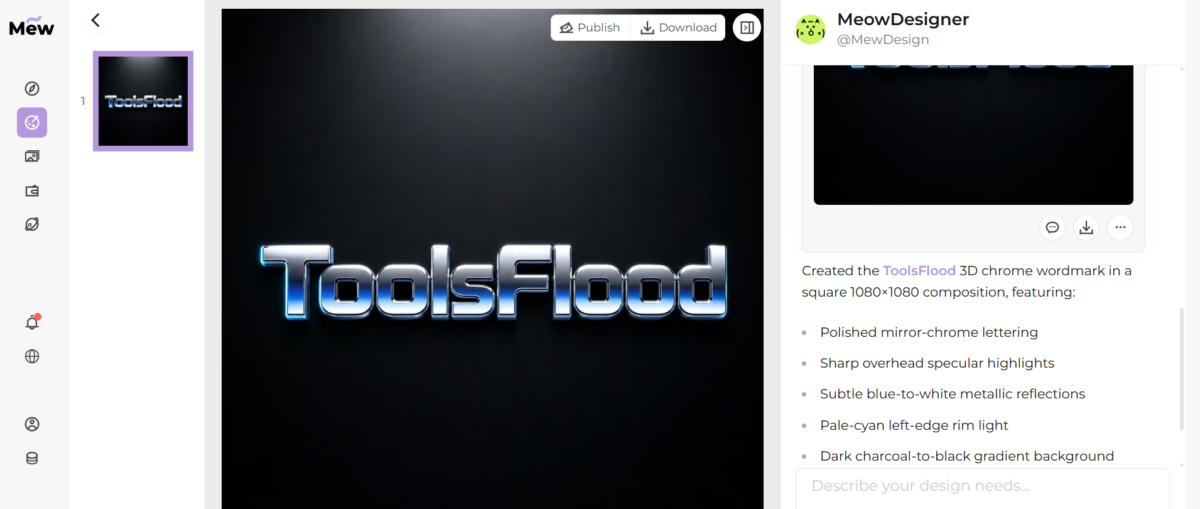
Mew Design’s AI 3D logo generator is a prompt-based tool that specifically understands material words like chrome, glass, clay, neon, bevel, and studio lighting – which matters a lot when your goal is a specific metal finish and not just “something shiny.”
How it actually works:
- You type your brand name, initials, symbol, color palette, and material (e.g., “chrome”).
- The AI design agent plans the mark, typography, depth, lighting, and layout, then generates a first draft.
- You use its built-in Chat Edit feature to ask for changes in plain language – “make the bevel cleaner,” “softer shadow,” “switch to gold” – without starting over.
- You export as PNG or JPG.
It gives 50 free credits after signup with no credit card required, and finished exports are watermark-free.
Best for: anyone who wants control over material, lighting, and mood through natural language, and who wants to keep chatting with the AI to refine the look instead of regenerating from scratch each time.
Mew Design
| Detail | Info |
| Free credits | 50 credits on signup (one-time, not monthly) = about 5 full logo generations |
| Cost per generation | 10 credits per new design, 5 credits per Chat Edit refinement |
| Editable / format | PNG only right now (with transparent background support). JPG, PDF, and SVG are listed as “coming soon”- so no editable vector yet |
| Download on free plan | Yes, exports are watermark-free even on the free credits |
| Common complaints | It’s a newer, smaller tool (around 17K monthly users), so there isn’t much public review history yet – can’t verify long-term reliability the way you can with bigger platforms |
3. MyAIArt Free AI Metal Logo Generator – Best Dedicated Metal-Only Tool
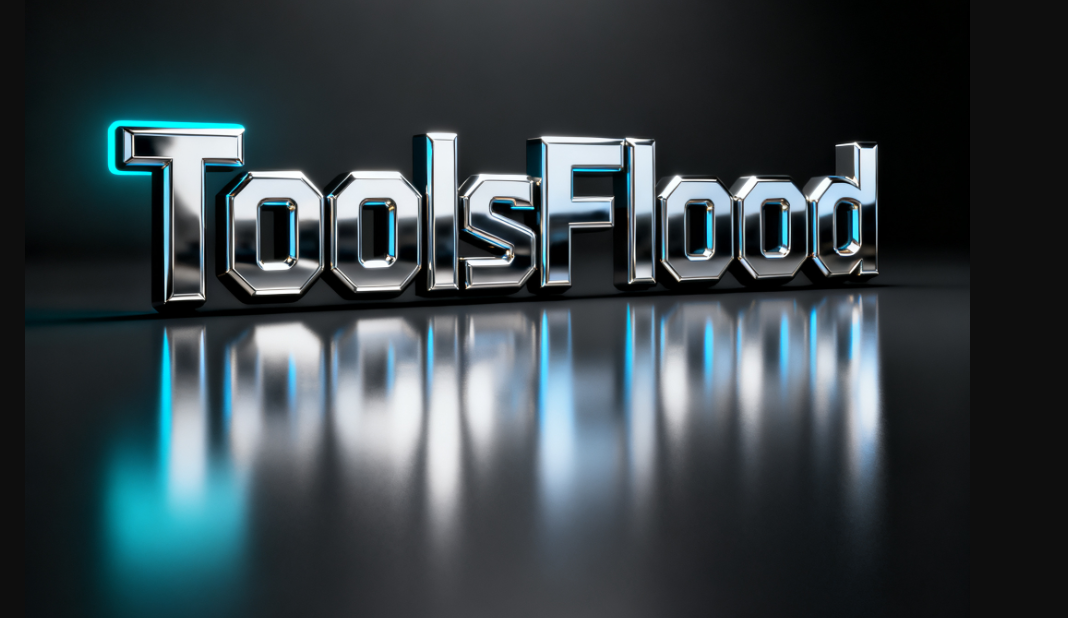
Unlike general-purpose 3D logo generators, this one is built specifically around metal textures. It’s designed to output PBR-style metal rendering – meaning it aims to simulate how light physically interacts with a metal surface, including micro-scratches, bevels, and reflections, rather than just applying a metallic filter over flat text.
Style options it supports: chrome, brushed steel, gunmetal, gold, black titanium, anodized aluminum colors, and rusted iron – covering everything from a clean corporate mark to a distressed industrial badge.
How to use it:
- Type your logo text, initials, or symbol, and describe the finish (chrome, gold, brushed steel, etc.). You can also upload a sketch or reference.
- Choose a style – 3D chrome wordmark, embossed/engraved emblem, brushed or polished metal, or a metallic gradient – and adjust bevel, thickness, camera angle, and glow.
- Generate several variations, refine texture and reflections, switch to a transparent background if needed, and download.
Downloads are high-resolution PNGs with transparent backgrounds and no watermark.
Best for: anyone who specifically searched “ai metal logo generator” and wants a tool built only for that job, instead of a general logo maker with a metallic option buried in a style menu.
| Detail | Info |
| Free credits | Free tier + daily check-in credits (earn more by logging in / community events); no fixed public number of “free generations” listed on their metal-logo page specifically |
| Cost per generation | Their separate text-to-image tool quotes ~$0.041/image on paid credits using their “NanoBanana” engine – no exact free-tier cap published |
| Editable format | PNG output, high-resolution, transparent background supported; not a vector/editable file |
| Download on free plan | Yes – downloads on the free tier are stated as watermark-free |
| Common complaints | Independent, verified reviews specifically for this tool are scarce online – it’s a smaller platform, so treat “100% free” claims with a pinch of caution and verify current limits live before relying on it |
4. insMind 3D Logo Generator – Best for Beginners Who Want Text or Image Input
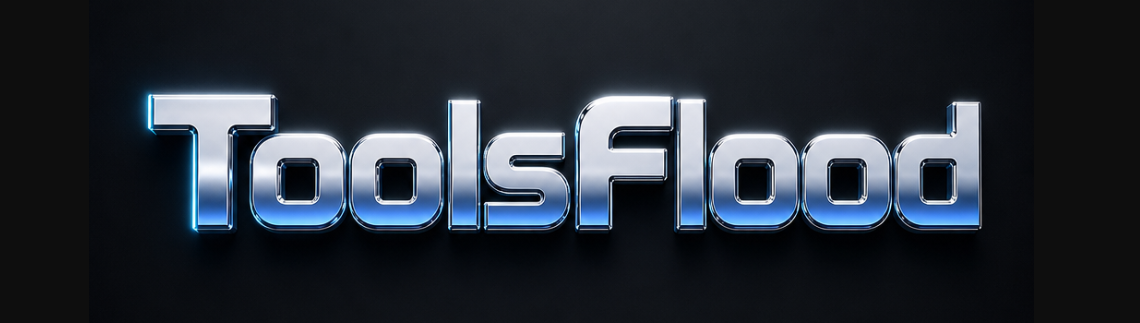
insMind’s 3D logo tool lets you go two routes: type your brand name and pick a style (including metallic), or upload an existing flat logo (PNG, JPG, or SVG) and let the AI add depth, lighting, shadows, and texture to it while keeping your original shape intact.
This second option is genuinely useful if you already have a logo you like, but it looks flat and dated – you’re not starting from zero; you’re upgrading what you have.
What you get:
- Text-to-3D-logo and image-to-3D-logo, both in the same tool
- Style options across glossy, metallic, matte, neon, and textured looks
- High-resolution export with a transparent background, suitable for both digital and print use
Best for: people who already have a flat logo and want to give it a 3D metallic upgrade without redesigning from scratch, or complete beginners who’d rather type a brand name than write a detailed prompt.
| Detail | Info |
| Free credits | 3-day free trial with 10 credits. Free plan includes standard tools but adds an insMind watermark |
| Paid tier | Pro = $9.99/month (100 credits/month), removes watermark, unlocks HD downloads |
| Editable format | PNG/JPG raster output; no vector/editable source file |
| Download on free plan | Yes, but with an insMind watermark unless you’re on Pro |
| Common complaints | Trustpilot reviews average low (2.5/5 across ~21 reviews) – recurring complaints about slow customer support and the system getting “busy” mid-generation, draining credits without producing a result |
5. TextStudio Metallic 3D Text Generator – Best for Instant, No-Signup Text Logos
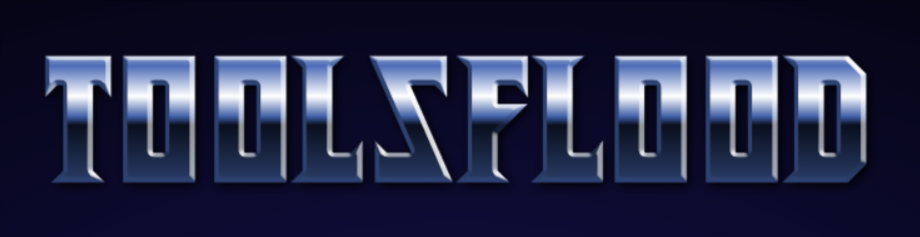
This one isn’t AI in the generative sense – it’s a parametric text-effect engine, meaning it applies real bevel, lighting, and reflection math to your text rather than predicting an image from a prompt. It’s worth including here because it’s genuinely fast and needs zero setup.
How it works: you type your text, pick the Metallic 3D style, adjust the bevel, lighting direction, point-light position, and gradient colors, then export.
The honest limits: the free version requires an attribution link back to textstudio.com on your download, and there’s a daily download cap. Unlimited, attribution-free, 4K downloads are behind their Premium plan. It also only handles text – no icons or symbols unless you import your own image separately.
Best for: a quick metallic wordmark you need in the next two minutes, or testing how your brand name looks in silver/gold before committing time to a fuller AI tool.
| Detail | Info |
| Free credits | No credit system – unlimited generations, but a daily download cap applies on the free tier |
| Editable format | Raster export (PNG); premium unlocks up to 4K resolution |
| Download on free plan | Yes, but requires an attribution link back to textstudio.com on your download; hitting the daily download limit blocks further downloads until it resets or you upgrade |
| Paid tier | Premium removes the attribution requirement, unlocks unlimited downloads, and 4K quality |
| Common complaints | Some users are frustrated by hitting the daily download limit quickly; TextStudio has publicly responded to this, saying core tools remain free and premium mainly unlocks convenience features, not the tool itself |
Which Tool Should You Actually Use?
- Need a real 3D file for a game, app, or 3D print? → Meshy AI
- Want full control over material and lighting through chat? → Mew Design
- Searching specifically for a metal-only AI generator? → MyAIArt
- Already have a flat logo and want it upgraded to 3D? → insMind
- Need a metallic wordmark in under 2 minutes? → TextStudio
Example Prompts You Can Copy and Customize for a Free AI Metal Logo Generator
1.Chrome Wordmark(Tech/Gaming Brand)Create a 3D chrome wordmark logo for the brand [BRAND NAME]. Use a bold, geometric sans-serif typeface with rounded corners and tight letter spacing. The material should be polished mirror chrome with high-contrast specular highlights and sharp reflections running along the top edge of each letter, as if lit by a single overhead studio softbox. Add a subtle blue-to-white gradient reflection across the surface to suggest a cool, futuristic environment reflecting onto the logo. Place the logo centered on a dark charcoal-to-black gradient background with a soft rim light outlining the left edge of the text in pale cyan. Keep the composition square (1:1), the text perfectly readable at small sizes, and the overall mood sleek, premium, and high-tech. Note: To keep this comparison fair, we ran this exact same chrome wordmark prompt across every tool mentioned in this blog. |
2.Gold 3D Emblem (Luxury/Hospitality Brand)Design a luxury 3D gold emblem logo using the initials [XY] inside a thin circular border. The letters should be carved with elegant serif detailing, beveled edges, and a warm 24-karat gold-plated finish with soft brushed texture on the flat surfaces and a glossy polish on the raised edges. Light the scene with a single warm key light positioned at the top-right, casting a soft golden glow and a subtle drop shadow toward the bottom-left, with a faint secondary rim light in pale champagne to separate the emblem from the background. Set the emblem against a dark matte obsidian or deep burgundy backdrop with a very slight vignette. The final design should feel editorial and premium, like a five-star hotel crest or a high-end jewelry brand mark, not flashy or cartoonish. |
Chrome vs Silver vs Gold vs Brushed Steel: Which Metal Fits Your Brand?
This is the part most guides skip, and it’s the one decision that changes how your final logo feels before you even open a tool.
| Finish | Look & Feel | Works Well For |
| Chrome | High-gloss, mirror-like, sharp reflections | Gaming, automotive, streetwear, tech gadgets |
| Silver / Brushed Steel | Softer shine, fine linear texture, industrial | Engineering, fitness, tools, B2B/SaaS |
| Gold | Warm, reflective, luxury feel | Jewelry, hospitality, finance, premium products |
| Gunmetal / Black Titanium | Dark, matte-to-satin, modern | Cybersecurity, esports, minimalist tech brands |
| Rusted / Weathered Iron | Distressed, gritty, textured | Bands, breweries, rugged outdoor gear. |
If you’re not sure which one fits, start with the emotion you want people to feel when they see your logo for half a second. Trust and premium quality usually point to silver or gold. Edge and energy usually point to chrome or gunmetal.
Frequently Asked Questions
Can I make a 3D metal logo for free without any design skills?
Yes. Every tool listed above is built for people with zero design background – you type a brand name or short description, and the AI or renderer builds the logo for you.
What’s the difference between a metal logo generator and a regular AI logo maker?
A regular AI logo maker focuses on layout, icons, and fonts. A metal logo generator specifically simulates how light interacts with metal surfaces – reflections, bevels, and material texture – to make the design look physically metallic instead of just colored gray, silver, or gold.
Which metal finish should I pick – chrome, silver, or gold?
Chrome suits bold, high-energy brands like gaming or automotive. Silver and brushed steel suit tech, fitness, and industrial brands that want a trustworthy, professional feel. Gold suits luxury, finance, and hospitality brands aiming for a premium look.
Why do my AI-generated metal logos look plastic instead of real metal?
Usually because the prompt didn’t specify a light source or reflection behavior; real metal’s look comes from how it reflects its surroundings and responds to a specific light direction, not just from the word “metallic.” Naming the exact finish (chrome, brushed steel, gold) and describing one clear light source in your prompt fixes this most of the time.
Comments