
Meshy AI Review 2027: Pricing, Features& Live Test Results
Is Meshy AI Worth It? Our Review and Recommendation
Once you factor in the speed, the plugin support, and the price, it’s easy to see why so many creators already call Meshy one of the best AI 3D modeling tools available right now. After going through every core feature, the real pricing structure, our own hands-on test, and what actual users report, here’s the honest take: we recommend Meshy AI for game developers, 3D printing businesses, and creators who want fast, usable 3D assets without months of learning traditional 3D modeling software.
The free plan is a genuine way to try it with zero commitment, and at the current launch price of $6/month (billed yearly), the Pro tier is priced well below what a single freelance-modeled asset would otherwise cost.
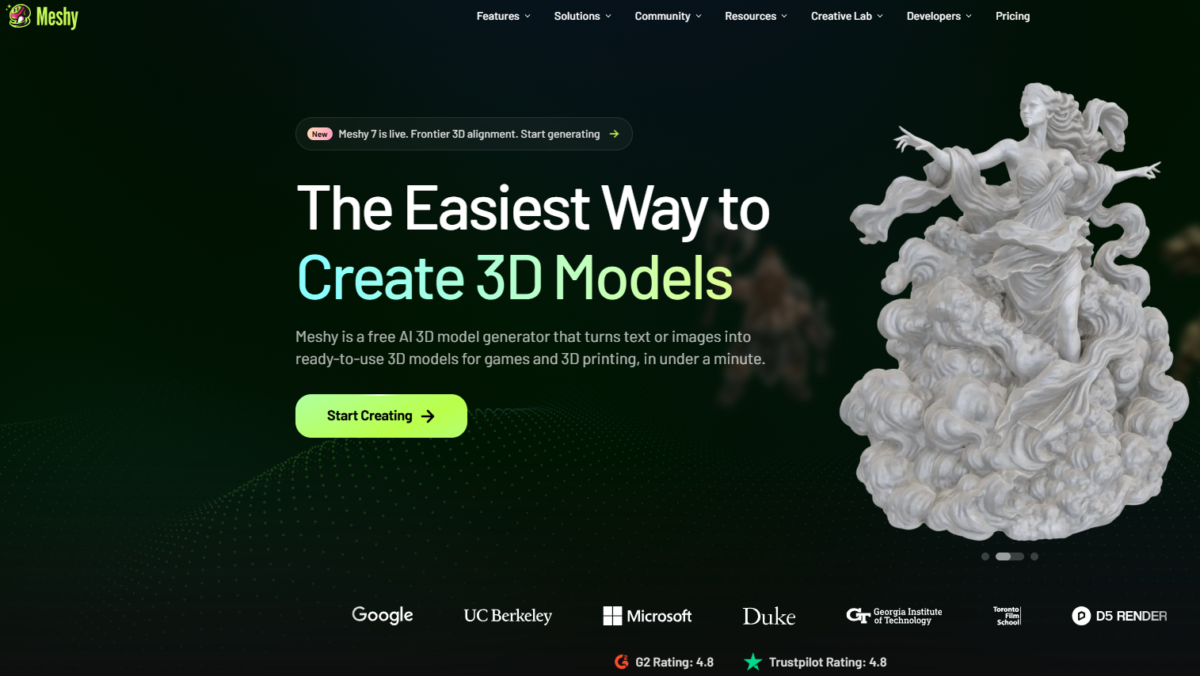
Meshy AI is an AI 3D model generator that turns a text description or a photo into a ready-to-use 3D model in under a minute – no 3D modeling skills required.
Think of it like this: if you’ve ever wished you could just describe an object out loud and have it appear as a real, downloadable 3D file, that’s basically what Meshy does. It’s used by game studios, 3D printing hobbyists, and complete beginners alike, and it recently became one of the best-funded AI startups in the 3D space.
It’s also become known as one of the fastest 3D AI generator options around, which is a big part of why it’s grown so fast. This listing covers everything Meshy actually offers, what’s free versus what costs money, a real prompt test we ran ourselves, honest user complaints, and how it stacks up against the competition.
Everything You Need to Know About Meshy AI
| Website | meshy.ai |
| Tool type | AI 3D model generator (text-to-3D and image-to-3D) |
| Founded | 2023 |
| Founder | Dr. Ethan Hu, an MIT PhD in computer graphics |
| Headquarters | Silicon Valley, California, USA |
| Users | Over 12 million creators, 100M+ models generated (per Meshy’s own figures) |
| Recent news | Closed a nearly $400 million Series B round in mid-2026, valuing the company at $1.5 billion |
| Free plan? | Yes – 100 credits a month, no credit card required |
| Notable customers | Meta, Nexon, NetEase Games, Bambu Lab, Hugo Boss, Stanford, and Harvard (listed on Meshy’s own site) |
What Meshy Actually Lets You Do
Text to 3D
This is the flagship feature, and probably why you’re here. You type a description – up to 800 characters, in any language – and Meshy returns a fully textured 3D model with proper PBR materials in around a minute.
There’s a Standard mode for detailed output and a Low-poly 3D AI generator mode (Meshy calls it Low Poly Mode), built specifically for anyone who needs to generate 3D game assets fast without sacrificing in-game performance.
Honestly, this is the feature that sells most people the moment they try it – watching a full sentence turn into a real, spinnable 3D object never quite stops feeling like a magic trick.
Image to 3D
Upload a photo, sketch, or piece of concept art, and Meshy converts it into a matching 3D model.
There’s also a multi-view mode that uses several angles of the same object for more accurate geometry, and a batch mode that can process up to 10 images at once – handy if you’re trying to turn a whole product catalog into 3D assets without doing it one at a time.
3D Agent
This is Meshy’s chat-based way into the whole process – instead of picking a mode, you just talk to it. Describe an idea, upload a photo, or paste a sketch, and the AI Agent walks you through turning it into a 3D model, answering questions about 3D printing or your project along the way. It’s a nice on-ramp if the idea of “prompt engineering” a 3D model sounds intimidating.
AI Texturing
You can generate a full PBR texture set (albedo, normal, metallic, roughness) on any model with one click, and switch on HD Texture for sharper 4K detail. This is the part of the workflow most 3D artists dread doing manually, so if you’ve been looking for a way to automate 3D texturing with AI instead of hand-painting every material, this genuinely saves real hours.
Animation and Auto-Rigging
Meshy can auto-rig both humanoid and quadruped characters and pair them with a library of over 600 motion presets – walk cycles, idles, jumps, attacks, gestures. If you need a 3D character animation without hand-placing bones and weight-painting a mesh yourself, this is built for exactly that. Paired with those 600+ motion presets, it works well as an AI 3D character creator for game characters that need to actually move, not just stand there looking good.
3D Printing Tools
Meshy makes a specific claim here worth mentioning: it says its models are the most likely of any major AI 3D tool to print successfully on the first try, because outputs come out watertight and manifold (translation: no holes, no broken geometry – the technical stuff that makes a 3D print actually work) rather than needing manual repair first.
If you’re specifically after a high-quality 3D mesh AI that prints clean without a repair pass, this is exactly where Meshy positions itself as the strongest option. It also includes multi-color printing support and an Auto Split feature that breaks a complex model into printable, pre-arranged parts.
API, CLI, and MCP Server
For developers, Meshy has a full API to plug 3D generation into your own app or pipeline, a CLI for turning a prompt or image into a model with one command, and an MCP Server that lets you generate 3D models directly inside AI coding tools like Claude and Cursor.
Creative Lab
A genuinely fun one: if you don’t own a 3D printer, Meshy will print your AI-generated design for real and ship the physical object to your door – chibi figures, keychains, vinyl figures, brick-style figures. It’s the closest thing to turning a text prompt into an actual toy sitting on your desk, no printer or design skills required on your end.
Plugins and Integrations
Meshy connects directly with Blender, Unity, Unreal Engine, Godot, Maya, 3ds Max, Roblox Studio, and several 3D printing slicers (Bambu Studio, Creality Print, OrcaSlicer, Cura, and more), so your generated model doesn’t just sit as a file – it can drop straight into whatever software you’re already using.
A Quick Word on Where Meshy Came From
Meshy was started in 2023 by Dr. Ethan Hu, who has a PhD in computer graphics from MIT – his thesis actually got an honorable mention at SIGGRAPH, which is basically the Oscars of the computer graphics world, so this isn’t someone who stumbled into 3D AI by accident. The team is based in Silicon Valley and includes people who previously worked at NVIDIA, Microsoft, and Google. Fun way to put it: while most of us were still trying to figure out how to use Blender’s camera controls, this team was busy teaching an AI to do the modeling for us.
The company grew fast. By mid-2026, Meshy had crossed 100 million models generated and 12 million users, and it closed a Series B funding round of nearly $400 million – one of the largest fundraises ever for a company built specifically around AI 3D generation – pushing its valuation to $1.5 billion. That’s a genuinely big deal in this space, and it’s worth knowing if you’re wondering whether Meshy is a serious, well-backed company or a small side project – it’s clearly the former.
Meshy AI Pricing: What’s Free and What Isn’t
| Plan | Price | Features |
|---|---|---|
| Free | $0 100 Credits/Month |
|
| Starter
|
$8/month (billed yearly at $96; regular price $10/month) 250 monthly credits (up to 25 assets) |
|
| Pro ⭐ Best Value | $6/month – 70% launch discount) 1,000 monthly credits (up to 100 assets) |
|
| Premium (Most Popular) | $12/month (billed yearly at $144; regular price $40/month – 70% launch discount) 3,000 monthly credits (up to 300 assets) |
|
Meshy also offers Ultra and Studio/team tiers above Premium, plus a custom Enterprise plan, for heavier or team-based usage.
Pro is the plan most reviewers land on, and with the current launch pricing, it’s an even easier call: $6/month (billed yearly) is the cheapest tier that gives you real private ownership of your assets, high queue priority, and 60% faster generation instead of a CC BY 4.0-licensed, slower-queued free result.
Is Meshy AI Actually Free?
Yes, genuinely – you can sign up with no credit card and get 100 credits every month, which is enough to generate a handful of models to see if the tool fits your workflow. But there’s a real catch worth knowing before you build a whole project on the free tier: models you generate on the Free plan are licensed under CC BY 4.0, not fully owned by you outright. That means you can use them, including commercially, but you’re expected to credit Meshy when you do. Only paid plans (Pro and above) give you full private ownership of what you create. Free-plan generations also sit behind a lower queue priority, so during busy periods, you may simply wait longer than a paying user for the same result.
If owning what you make matters for your project actually- selling models, using them in a commercial game, or just not wanting to credit a tool every time – Pro is really the point where Meshy starts working for you rather than against you.
What this actually costs compared to the alternative: hiring a freelance 3D artist for a single custom model typically runs $50 to $500 or more, depending on complexity. Meshy’s Pro plan is $6 a month for up to 1,000 credits – meaning even a handful of models a month works out far cheaper than a single freelance commission, and you keep going back for more without booking anyone’s time.
A Live Test: What Meshy AI Actually Generates
What we used: We uploaded one photo of a red rose to Meshy, using the completely free image-to-3D feature.
First, we generated it with the color Texture option turned off, just to see the raw shape. Then we turned Texture on and generated it again to see the full-color version.
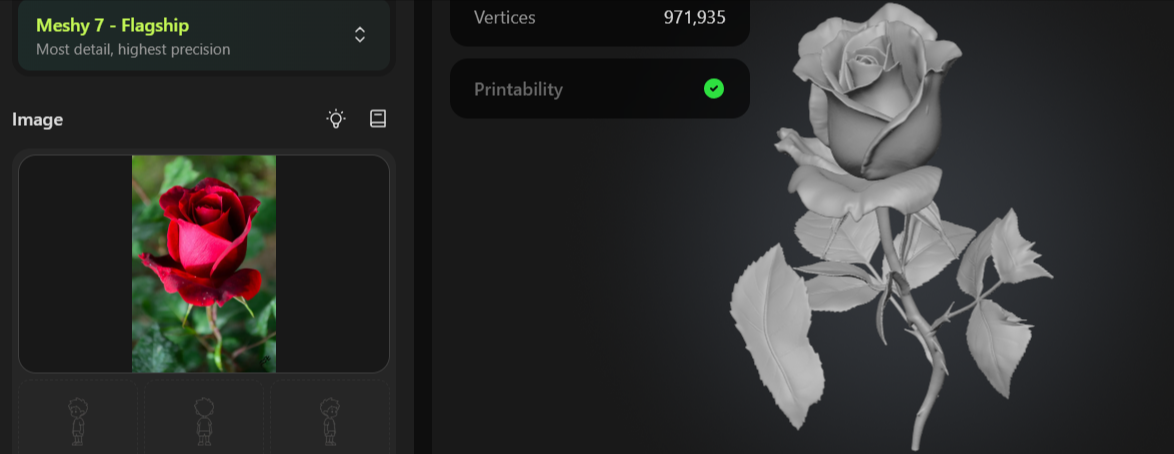
What we noticed (shape/geometry): Even without color, the shape came out really clean. Every petal is separate and layered properly, the leaves have visible veins, and the thorns on the stem are all there. Meshy also showed a green checkmark for Printability, meaning this model is ready to 3D print with no extra fixing needed.
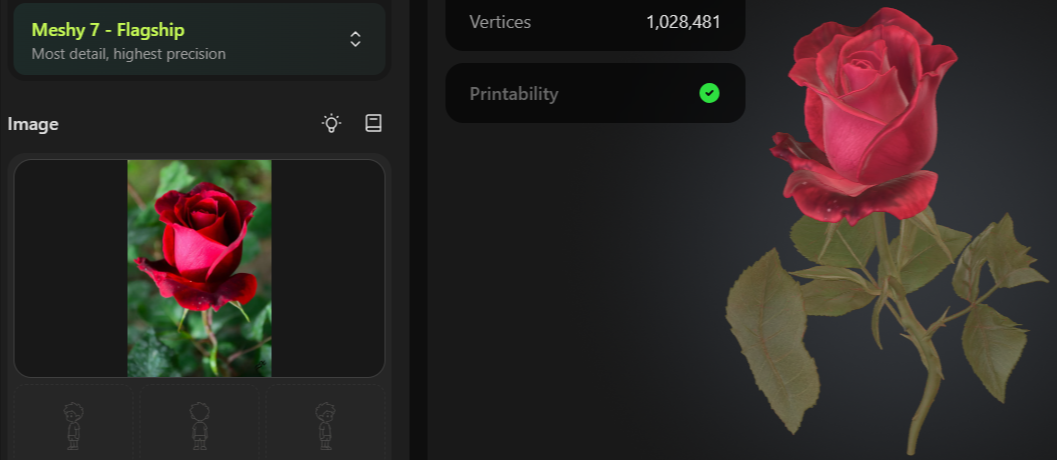
What we noticed (with Texture turned on): This is where it got genuinely impressive. The rose came out in deep red, the leaves have a natural green-and-brown tone just like a real rose bush, and even small color details on the petals came through. The model itself is made up of 1,944,106 faces and 1,028,481 vertices, which is a lot of detail for something generated automatically from just one photo.
Our takeaway: Both the shape and the color turned out great, and we didn’t pay a single rupee for any of this – no Multi-view, no Ultra Mode, nothing paid was switched on.
If this is what the free version can do, it’s easy to see why people are willing to pay for the extra speed and features on the paid plans.
What Real Users Say
Meshy’s own site cites a 4.8 out of 5 on both G2 and Trustpilot. Independent sources report similar numbers with some variation – Trustpilot sits around 4.8 from roughly 2,300 reviews, and G2 has been reported anywhere from 4.7 to 4.8 depending on when it’s checked, from several hundred reviews.
What people consistently like:
- Genuinely fast – going from an idea to a usable 3D object in under a minute changes how people prototype, described by more than one reviewer as changing their entire workflow
- Strong PBR texturing quality, repeatedly called out as a standout feature
- Auto-rigging and the animation preset library get specific praise for saving real time on character work
- Clean, intuitive interface that doesn’t require any 3D modeling background to start
What people consistently flag:
- Topology and UV issues on complex models (the single most repeated complaint across G2 reviews)
- Inconsistent results, especially with detailed or unusual prompts
- Free-tier download and ownership restrictions catching some users by surprise
- No PayPal as a payment option, only card-based payment through Stripe
- Some reports of subscription and billing confusion
Who Should Use Meshy AI (And Who Shouldn’t)
It’s become one of the more talked-about AI tools for 3D artists who want to skip the slow, early blocking stage of a project and get straight to something they can actually look at from every angle.
Good fit for:
- Game developers who want to create 3D assets for games using AI instead of hand-modeling every prop and character from scratch – genuinely useful if you’re a solo dev or small team without a dedicated 3D artist
- 3D printing hobbyists who want a AI 3D model generator for 3D printing that outputs watertight, ready-to-slice files without a repair pass
- Concept artists and creators who want to go from an idea to a rough 3D object in minutes for visualization, pitching, or prototyping
- Anyone experimenting with AI creative tools who wants a genuinely low-effort way to see an idea turned into a real, physical object through Creative Lab
- Small studios looking for a 3D tool for game developers that doesn’t require a big art-team budget to populate a level
Probably not the right fit for:
- Engineers or product designers needing millimeter-precise mechanical parts
- Anyone expecting the Free plan to give full commercial ownership with no attribution requirement
Strengths and Weaknesses Of Meshy AI
Strengths
-
-
- Genuinely fast – most models generate in under a minute
- Strong, well-reviewed PBR texturing
- Real, working free plan (100 credits/month, no card needed)
- Backed by a $1.5B valuation and serious funding, not a fly-by-night tool
- Wide plugin support (Blender, Unity, Unreal, major slicers)
- Auto-rigging with 600+ motion presets saves real animation time
-
Weaknesses
-
-
- Topology and UV mapping can be messy on complex shapes
- Faces, hands, and fine anatomy remain a weak point
- No PayPal, only card payment through Stripe
- Precise mechanical/hard-surface parts come out approximated
-
Frequently Asked Questions
Is Meshy AI free?
Yes. The Free plan gives you 100 credits a month with no credit card required, though free-plan outputs are licensed under CC BY 4.0 rather than fully owned outright, and generation queue priority is lower than on paid plans.
How do I make 3D models with AI using Meshy?
You type a description or upload a photo, and Meshy generates a textured 3D model in under a minute – no 3D modeling software or prior experience required. This is the simplest answer to how to make 3D models with AI if you’ve never touched Blender or any traditional 3D tool before.
What is Meshy AI pricing?
Meshy currently has Free ($0), Starter ($8/month), Pro ($6/month with an active launch discount), and Premium ($12/month with an active launch discount off the regular $40/month price) as its core individual plans, plus higher-volume Ultra, Studio/team, and custom Enterprise pricing above that.
Exact numbers and any active discounts are best confirmed on Meshy’s own pricing page, since launch offers are time-limited.
How does Meshy AI’s image-to-3D feature work?
You upload a photo, sketch, or concept art, and Meshy generates a matching 3D model, typically in about a minute. A multi-view mode can combine several angles of the same object for more accurate geometry, and batch mode handles up to 10 images at once.
For a logo-focused example, check out our Free AI 3D Metal Logo Generator guide.
Can I use Meshy-generated models commercially?
Yes, on paid plans you fully own everything you create. On the Free plan, you can still use models commercially, but they’re licensed under CC BY 4.0, which means crediting Meshy when you use them.
Is Meshy AI good for 3D printing?
Yes – it’s actually one of Meshy’s biggest selling points. Meshy says its models come out watertight and manifold, meaning they’re ready to slice and print without the manual repair pass that many other AI 3D tools require.
What file formats does Meshy export?
Meshy supports FBX, OBJ, USDZ, GLB, STL, and .blend for exporting generated models.
Does Meshy AI offer an API?
Yes, Meshy has a full API for developers, plus a CLI tool and an MCP Server for generating 3D models directly inside AI coding tools like Claude and Cursor.
Meshy AI vs Tripo AI: which one should I use?
Tripo AI’s Pro plan runs $19.90/month for 3,000 credits, and it’s genuinely known for strong auto-rigging – several 2026 comparisons specifically call this out as an advantage over Meshy, along with generally clean topology on props and stylized assets (though character topology can still need manual cleanup once it’s actually animated).
Meshy’s Pro plan is currently running a launch discount of $6/month, which makes it noticeably more affordable than Tripo’s comparable tier.
Meshy AI vs Rodin (Hyper3D): what’s the real difference?
Rodin is generally positioned as the higher-end, higher-fidelity option, producing very high-polygon, near-photorealistic output, but at a noticeably higher price (Creator plans around 24–30/month, with Business tiers reaching well over $100/month). Meshy is the more affordable, faster-iteration option for stylized game assets and general use.
Meshy’s pricing and speed make more sense for most people.
Why We’d Start With Pro?
If you’re only curious, the Free plan is genuinely fine – 100 credits is enough to test the waters with zero commitment. But if you already know you’re going to use this for a real game, print project, or ongoing creative work, starting on Pro directly tends to make more sense than most people expect: you skip the CC BY 4.0 attribution requirement from day one, you get 10x the monthly credits, and generation runs noticeably faster. At $6 a month, it’s less than the cost of a single freelance-modeled asset, and you’re not stuck waiting in a slower queue while you figure that out the hard way after a few weeks on Free.
Meshy AI is one of many AI 3D modeling tools worth comparing before you commit to a subscription to one, and if you like seeing real pricing, honest limitations, and actual test results laid out clearly, that’s what ToolsFlood is for. Want to see how other AI 3D generators compare? Browse more AI tools on ToolsFlood before you decide.