
Media - AI menu generator
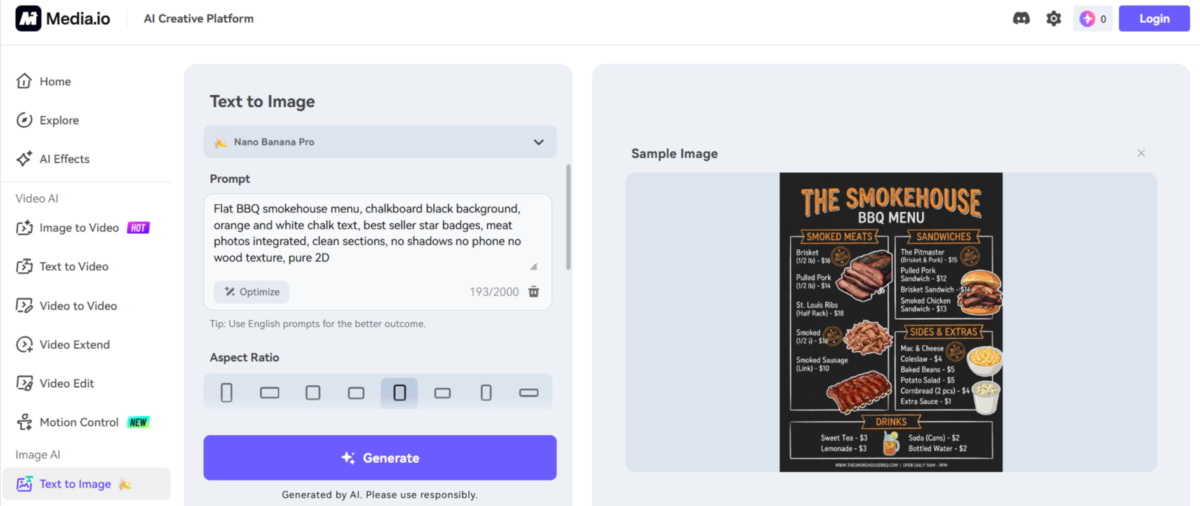
If you need a quick, professional-looking menu design without hiring a designer or learning Canva/Photoshop, Media.io’s AI menu generator can help. It’s one of the best AI menu generators for restaurants, small parties, home functions, food stalls, or test projects.
It’s simple: add your text prompt, choose settings like aspect ratio and resolution, and the AI creates a print-ready PNG menu in seconds. You don’t need templates, layout knowledge, or typography skills. The system automatically manages font pairing, spacing, visual hierarchy, colors, and structure, giving you a clean, ready-to-use design instantly.
When you sign up, you receive daily credits as a gift, allowing you to test the tool immediately without paying upfront. Typically, users get a few check-in credits per day, and each generation produces one high-resolution menu image at a time.
This is enough for one or two quick experiments daily, ideal if you’re testing styles like small café, or fast food truck menus.
The biggest advantage here is speed and convenience. Instead of spending hours designing or paying $2,000–$5,000 to a local designer, you can generate a professional-looking layout within seconds. It’s especially useful for temporary events, birthday parties, festival stalls, or Instagram food promotions.
The platform is owned by Wondershare Technology Group, founded in 2003 in Shenzhen, China.
The company has been listed on the Shenzhen Stock Exchange since 2018.
Looking for more useful AI tools like this? Browse a full collection at ToolsFlood:
They are also behind well-known products like:
- Filmora
- PDFelement
- UniConverter
Wondershare claims to serve over 30 million users worldwide.
Available AI Models
The platform gives access to several AI models:
- Nano Banana Pro
- Nano Banana 2
- Seedream 5.0 Lite
- Soul Character
- Nano Banana
- Seedream 4.0
- Imagen 4
- Tomoviee 2.0
- Basic (VIP Free)
Among these, Nano Banana models are known for faster generation speed, often producing menus within seconds.
How Does Media.io’s AI Menu Generator Work?
This is a Text-to-Image (or Image-to-Image) AI menu generator.
You simply paste:
- Dish names
- Prices
- Sections (Starters, Main Course, Desserts, etc.)
- Style notes (elegant, modern, neon, minimal, bold colors, etc.)
The AI instantly creates a:
- High-resolution PNG
- Clean typography
- Proper visual hierarchy
- Styled color theme
- Print-ready layout
No templates.
No Canva.
No Photoshop.
No design skills needed.
It automatically handles spacing, font pairing, layout structure, and styling.
Customization Options and Output Format
The AI menu generator gives you full control over important output settings to match your specific needs. You can write prompts up to 2000 characters, allowing you to clearly define dish names, prices, layout structure, and detailed style instructions. It also lets you set the aspect ratio (such as portrait or square) and choose your preferred resolution, ensuring the design fits perfectly across different platforms.
The final output is delivered as a static high-resolution PNG, ready for immediate use. However, keep in mind that the file is not editable; you receive a final PNG image only, with no layered design file included.
7 Ready-Made Prompt Templates for AI Menu Generation by Media.io
The page includes a large table with 7 ready-made prompt styles. These are structured prompts you can copy and paste:
- Modern Cocktail Bar
Dark, elegant theme with neon accents. Includes cocktails with prices. - Fine Dining
Cream/beige with gold accents. Structured appetizers, mains, and desserts with descriptions. - Casual Café
Warm tones, hand-drawn icons, avocado toast-style items. - Fast Food Takeout
Bold red and yellow layout with burgers and sides. - Italian with Photos
White background with pasta and pizza images included. - Chinese with Photos
Red and gold theme with appetizing dish visuals. - Food Truck Taco
Bright Mexican-inspired colors.
These structured prompts help beginners get professional-looking results without understanding design principles.
Real User Feedback
Based on Trustpilot reviews (Feb 2026), some repeated concerns include:
- “Credits run out within a few images.”
- “Even simple tasks eat credits fast.”
- “Charged extra when unhappy with the result.”
Reddit users also mention:
- Some outputs look sharp and professional
- Others have blurred text
- Occasionally crowded layouts
Minor AI text errors or hallucinations
So quality can vary depending on model, prompt clarity, and luck.
A Detailed Prompt Test of the AI Menu Generator
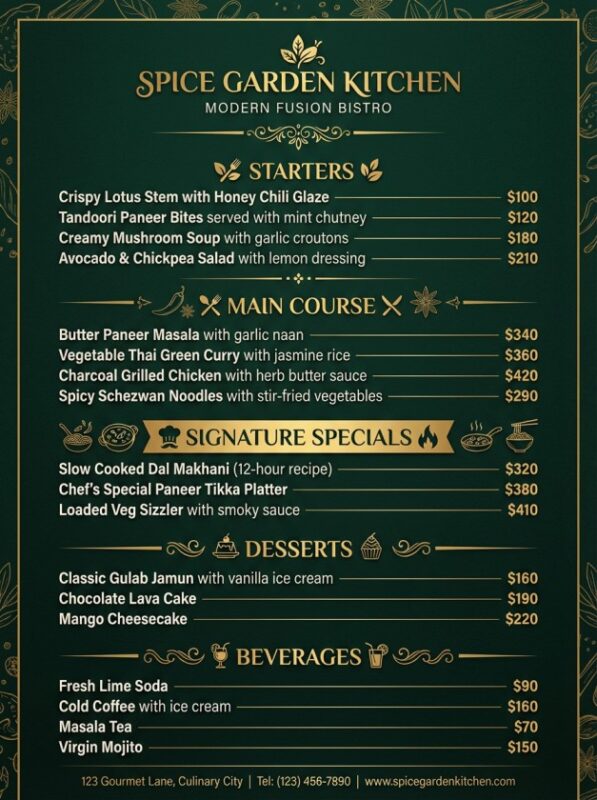
Below is the exact prompt used to test the AI menu generator, along with the actual generated result screenshot so you can clearly see how the tool handles layout, typography, dish sections, and price alignment.
Design a professional restaurant menu for a modern fusion bistro called “Spice Garden Kitchen”. The menu should have an elegant dark theme with deep green and gold accents, clean typography, and clear section hierarchy. Use a vertical layout suitable for printing.
Sections:
STARTERS
– Crispy Lotus Stem with Honey Chili Glaze – $100
– Tandoori Paneer Bites served with mint chutney – $120
– Creamy Mushroom Soup with garlic croutons – $180
– Avocado & Chickpea Salad with lemon dressing – $210MAIN COURSE
– Butter Paneer Masala with garlic naan – $340
– Vegetable Thai Green Curry with jasmine rice – $360
– Charcoal Grilled Chicken with herb butter sauce – $420
– Spicy Schezwan Noodles with stir-fried vegetables – $290
SIGNATURE SPECIALS
– Slow Cooked Dal Makhani (12-hour recipe) – $320
-Chef’s Special Paneer Tikka Platter – $380
– Loaded Veg Sizzler with smoky sauce – $410
DESSERTS
– Classic Gulab Jamun with vanilla ice cream – $160
– Chocolate Lava Cake – $190
– Mango Cheesecake – $220
BEVERAGES
– Fresh Lime Soda – $90
– Cold Coffee with ice cream – $160
– Masala Tea – $70
– Virgin Mojito – $150Style notes: elegant fine-dining style, gold separators between sections, balanced spacing, clear readable prices aligned to the right, subtle food icons, modern luxury restaurant aesthetic, high-resolution printable menu.
Strengths
-
- No design skills required
- No templates needed
- High-resolution PNG output
- Saves money compared to hiring a designer
- Multiple AI models available
Weaknesses
-
- Credits run out quickly
- Only static PNG (not editable)
- Inconsistent text sharpness
- The layout can feel crowded sometimes
- Minor AI mistakes possible
- Not ideal for professional restaurant branding
-
Our Opinion
We think Media.io’s AI menu generator is a good pick if you’re searching for the best AI menu generator for restaurants, cafés, or one-off food events. it’s fast, affordable, and easy to use even if you’ve never designed anything before. But it’s not the right fit if you need a fully editable file or a menu built for premium restaurant branding.
Frequently Asked Questions
Is Media.io’s AI menu generator free to use?
Yes. You get a small batch of free credits every day when you sign up, which is enough to test the tool and generate one or two menus without paying anything upfront. If you need more designs regularly, you’ll need to buy extra credits once your daily allowance runs out.Pricing (approximate):
- Free plan: 3 credits/day – $0
- Standard plan: Starts from around $5-7/month (more credits + better features)
- Premium plan: Higher price (starts with a free 3-day trial)
Can I edit the menu after Media.io generates it?
No. The output is a static PNG image, not an editable file. If you want to change the price of one item or fix a typo, you’ll need to write a new prompt and generate the menu again; there’s no layer-based editor.How many free credits does Media.io give per day?
Media.io gives 3 free credits per day. You get them by logging in and claiming the daily check-in credits (they last 24 hours and don’t stack). This is the official free daily allowance for free users.Is Media.io a good AI menu generator for restaurants, or just small events?
It works well for cafés, food stalls, pop-ups, and casual dining menus, but it’s not built for detailed, print-ready branding that fine-dining restaurants usually need. For that kind of work, a professional designer or a more advanced editing tool is still a safer choice.What is the best AI menu generator for restaurants right now?
It depends on your budget and what features you need. We compared some of the best AI menu generators, including Media.io, in our guide to the 6 best AI menu generators guide, It covers pricing, menu quality, and editing options so you can choose the one that fits your restaurant.How is Media.io’s AI menu generator different from Venngage?
Media.io focuses on fast, prompt-based image generation, while Venngage’s AI menu generator leans more toward drag-and-drop editing with ready-made templates, which is better if you want more control over the final layout.Is Media.io better than Template.net’s AI menu generator?
Both take different approaches. Media.io generates a finished PNG from a text prompt in seconds, while Template.net’s AI menu generator gives you access to editable templates you can customize manually after the AI creates a base design.